Editor workflow
Open any scene with an S3Space3D and click S³ at the top of Godot. Model local assemblies in the ordinary 3D viewport, then check their silhouette and placement in S³.
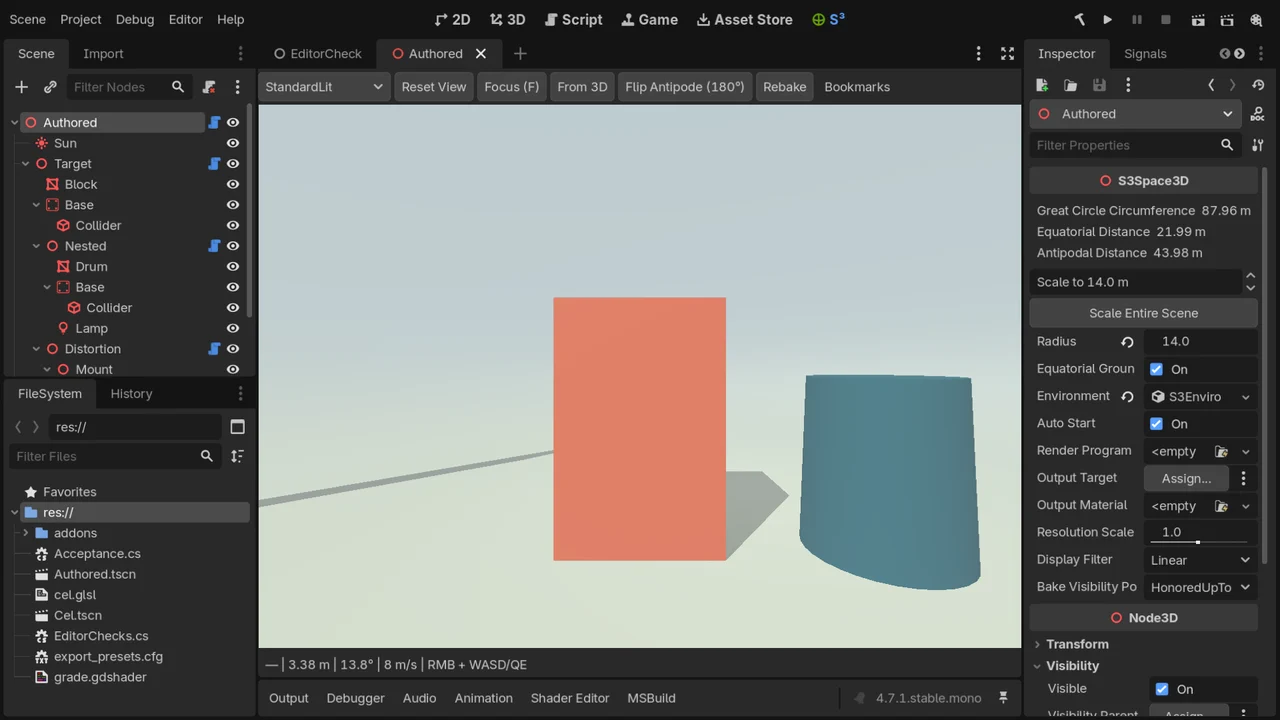
Toolbar and navigation
Section titled “Toolbar and navigation”| Control | Action |
|---|---|
| Space / ViewMode | Pick the active space (when multiple exist) and preview mode (StandardLit, ClayClean, Unlit, or custom providers). |
| Reset View / Focus (F) | Reset camera and pivot, or frame the selected anchor (F while the preview has focus). |
| From 3D | Map the 3D viewport camera into , smoothly blending near anchors with EditorChartRadius > 0. |
| Flip Antipode (180°) | Jump to the camera’s antipode and look back at the current pivot. |
| Rebake / Bookmarks | Rebake the preview or save/restore named camera bookmarks. |
| Input in preview | Action |
|---|---|
Hold RMB + mouse, WASD, Q/E |
Fly (Shift for 2.5× speed; scroll while flying to tune speed 2–32 m/s). |
MMB drag / Shift + MMB drag |
Orbit pivot / pan camera and pivot. |
| Scroll | Dolly along view direction. |
| LMB | Pick geometry via the spherical-cap BVH and set orbit pivot (ground click clears selection). |
Moving anchors and scaling a scene
Section titled “Moving anchors and scaling a scene”Select any S3Anchor3D in the edited scene to show its gizmo: drag the X or Z arrows along local axes, the center handle across the local XZ plane, or the ring to yaw. Releasing LMB writes the displacement into RelativeSpin with full Undo/Redo support. If an anchor sits right at the camera’s antipode (within 0.02 rad), the gizmo hides — press F to reframe.
The Inspector displays Farthest vertex, Chart angle, and Radial compression on anchors, and great-circle distances on S3Space3D.
- Edit Radius directly to change curvature while keeping existing metre coordinates intact.
- Use Scale to → Scale Entire Scene to scale
Radiusand all metric scene values proportionally by (undoable; skips nested spaces and viewports).
Automation hooks
Section titled “Automation hooks”For automated preview inspection or custom editor shaders, GlomeEditorPlugin exposes TryGetViewState, SetView, FocusNode, RequestRebake, CapturePreviewImage, ReloadPreviewShader, and the file-polled GlomeEditorBridge (BridgeDirectory / BridgeShaderReload). Editor extension API